
Chromecast Amazon Prime Instant Video from Android
Since Amazon has released their Prime Instant Video app for all Android devices, it’s now possible to Chromecast Amazon Prime video right from your Android phone. Unfortunately iphone and ipad users are left out in the cold on this one, but of course you can still cast videos from your PC or Mac. When following the technique below, make sure to plug your phone as this will drain your battery.
Step 1 – Download the Amazon Prime Instant video app
On your Android phone, head over to this link to download the Amazon Underground App (Formerly App Store). You will need to make sure your phone is configured to allow sideloading of apps. To do this, go to Settings -> Security and make sure “Unknown sources” is checked. If this is already checked, then you will be able to install the Amazon Underground App.
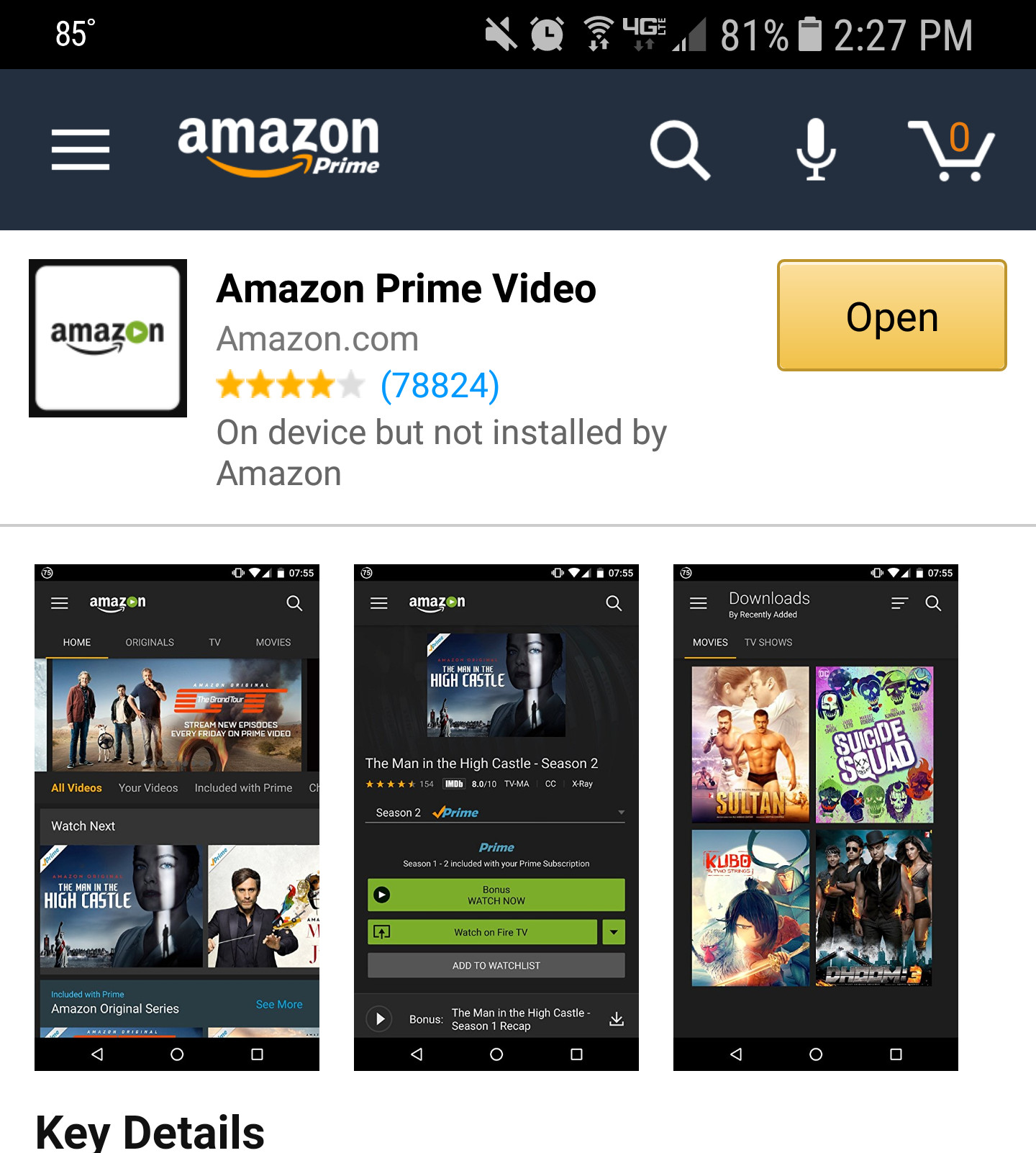
After you have the Amazon Underground App installed, you will need to install the Amazon Prime Video app. Simply search for it and click install. If you have a Samsung device, there is a good chance that this app has been pre-loaded on to your phone.
Step 2 – Cast your screen
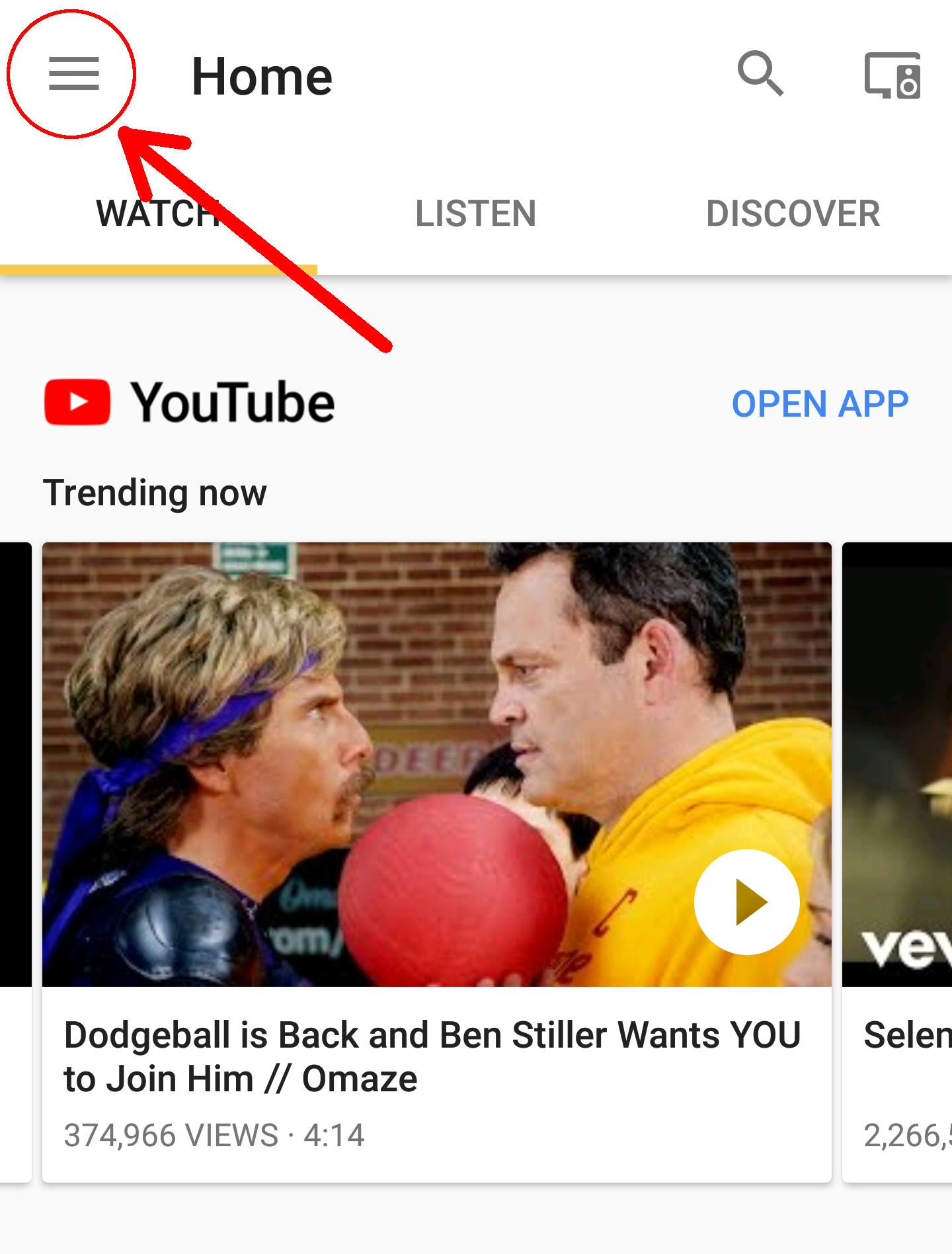
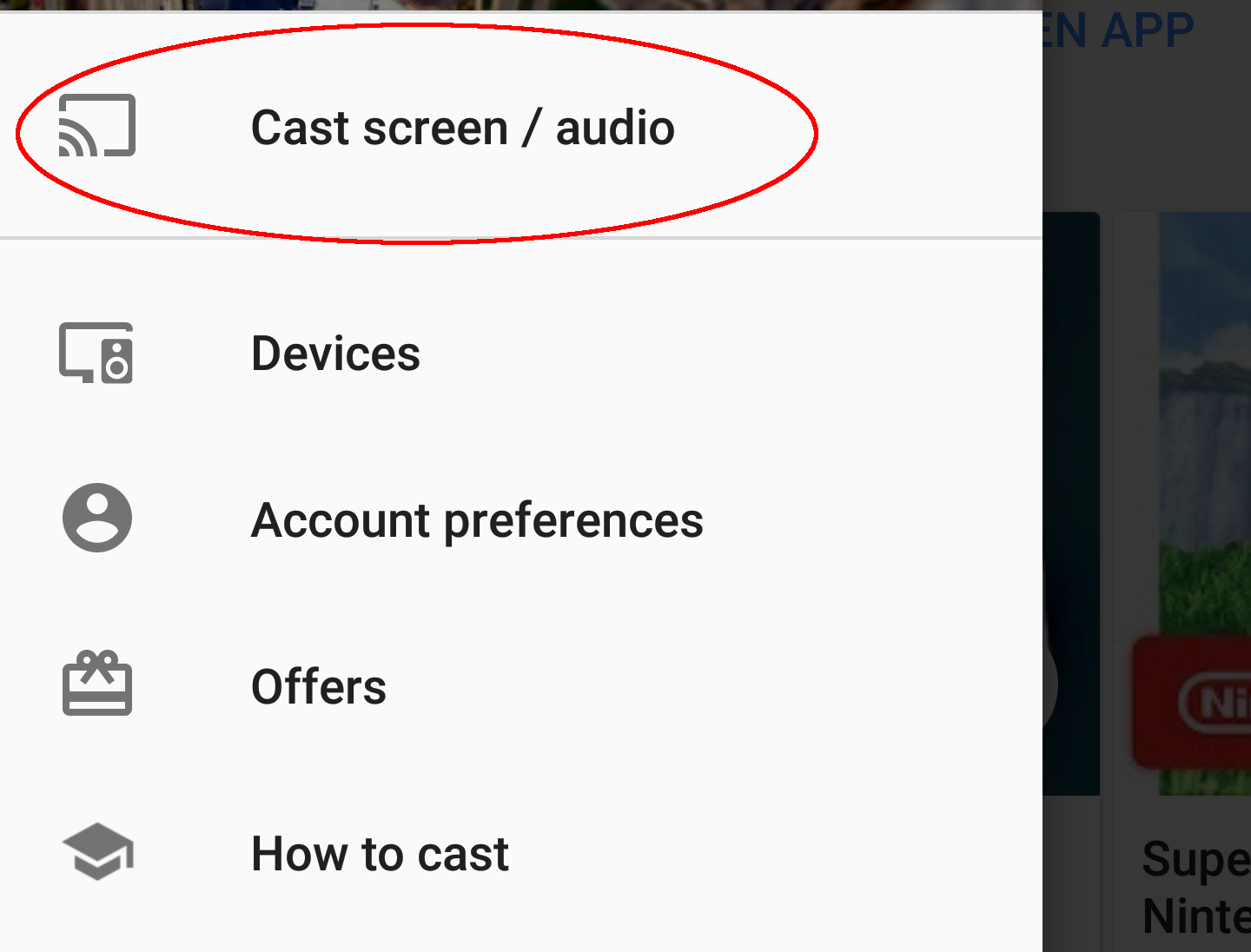
Open up the Google Home App ( Formerly Chromecast app) on your phone. Once it finishes loading, click the hamburger icon in the upper left corner and click cast screen. Once you do this, it will prompt you to select which Chromecast you would like to cast your screen to.
Step 3 – Watch an Amazon Prime video
Now that you are successfully casting your screen to your Chromecast, you are ready to start watching an Amazon Prime Instant Video. All you need to do now is open up the Prime Instant Video app and start watching something. You will see that what ever you watch on your phone is now displayed on your Chromecast. You can use this technique to mirror just about any app onto your Chromecast. I think the only app that doesn’t work is NFL mobile…go figure.
Side note
One thing to keep in mind is that your Android’s screen may appear to be zoomed in on your TV. To fix this, all you need to do is go into the settings and change the aspect ratio to “just scan” or “1:1”.
If that’s still not enough, you can watch the YouTube video below
https://www.youtube.com/watch?v=cOpY5n5aQKo

This no longer seems to work. My Chromecast app no longer shows the “Cast Screen” option in its device menu. I see “Discover Apps”, “Backdrop”, and the rest, but not “Cast Screen”. Any updates on how to make this work?
Exactly the same issue with me. Someone please help!
Did you ever have the option to cast your screen? Not all phones have this capability.
My phone won’t let me upgrade to 4.4.2 but that is a separate issue. Once sorted from what you say it should work. I will report back thank you.
According to Google, you need to have 4.4.2.
https://support.google.com/chromecast/answer/6059461?hl=en
What phone do you have?
I have an Android – Samsung Galaxy S4.
Have you checked to make sure the Chromecast app is up to date on your phone?
Yes, I specifically checked that. It’s fully up-to-date.
Did your phone get updated to Lollipop recently?
I’m not sure about the code names. As I said, I am running Android version 4.3. Are you sure these instructions are not outdated?
You need 4.4.2 or higher in order to do screen mirroring unfortunately…
https://support.google.com/chromecast/answer/6059461?hl=en
Did you receive the update to Lollipop on your phone? If you did, is this method working now?
No. Like I said, I have version 4.3. Apparently Verizon is not yet pushing 5.0 to the Galaxy S4.
No joy for me either. I’m on Android version 4.4.2 with my Galaxy 4 mini. Once I’m casting my screen I try to flip to Amazon Instant Video app. The Amazon app just crashes. I’m on the latest version of both the Chromecast and Amazon Instant Video app. They just don’t play nice with each other.
I tried bit no luck k from desktop, the frame was there but the video content missing
Works great but no audio on tab or tv samsung 8.4 442
This happened to me a few times. Did you try rebooting your device? For me, it would work for about 5-10 minutes, then audio would stop working.
I did this yesterday, 4/21/15. Worked great. Turned off TV for the night, and when I TRIED to turn on my nice Samsung TV this morning it will not turn on. It keeps trying and trying; clicking & clicking, but will not turn on. Any help please? Not a coincidence. Android Samsung S4
Sounds like something is going on with your TV. I would try unplugging it for a few minutes then plug it back in. You may want to unplug your Chormecast from your TV too.
Worked for me on my new Galaxy s5 beautifully. I can’t believe Amazon doesn’t have a built-in option to chromecast. Guess they’re trying to push their stupid Kindle stick. Get on board, Amazon.
I agree with @katconnors:disqus. The app should have a built-in Chromecast option. Get with the program Amazon!
It’s not Amazon…Google refuses to allow the Amazon app on Chromecast
That doesn’t make any sense. Google has no reason not to allow apps to use Chromecast; the more sites that use it, the better it is for Google. The issue is that Amazon doesn’t want to put the app on the Play Store and use Google Play Services. They would rather you buy the Amazon Fire hardware in order to play it on your TV.
Wrong. Amazon refuses to develop their app.
http://variety.com/2015/digital/news/platform-wars-and-backroom-deals-why-amazon-ditched-apple-tv-and-chromecast-1201608748/
Anyone can build casting into their apps. Google Cast is an API available for anyone. This is completely about Amazon wanting to sell more Fire sticks.
Which is exactly why Hulu and Netflix are huge and most people are unaware of Amazon videos.
no that’s not correct Google allows all of the Amazon apps in its app store
It is up to Amazon whether they wish to incorporate the Chromecast option within it’s app. Casting is literally opening up a streaming option it has nothing to do with getting approval from Google to build that option into your app. the Casting button in apps is not exclusive to Chromecast it can be used for Miracast and other casting devices
Two years ago when darrsil posted that comment Google didn’t carry any Amazon apps in it’s Play Store. That had changed only recently. Maybe it’s a sign that their long standing feud is calming down…
Question…to adjust the screen display, do I need to go into the settings on my TV to change the aspect ratio to “just scan” or “1:1”? If not, where do I find these settings? Please help! 🙂
Take a look through your TV’s settings and look to see if you can adjust the aspect ratio. Normally it has settings such as 16:9, 4:3, wide-fit etc… Hopefully you have the option for just scan or 1:1. A lot of the older TV’s don’t have this feature. Who is the manufacturer of your TV?
Why would Amazon get on board? You expect them to lose money just to make things convenient for you. Maybe you should get on board and buy a Fire Stick lol. Just doesn’t make sense to implement a feature in their product that would take away from the sale of another product.
Why wouldn’t Amazon get on board? They aren’t making much money from the Fire Stick anyway. They want people to use Amazon Instant Video, Amazon Prime, and ultimately buy anything/everything from Amazon (not just digital goods, but all kinds of goods). Amazon is not Google. Google is mostly a company that sells services. Amazon, however, is selling products.
Stephen,
You can buy Chromecast on Amazon, but Amazon won’t let you play their PAID subscription videos on it? Doesn’t strike you as…disingenuous? Greedy? Strikes me as pretty F’d up.
Actually, nope. Amazon changed that policy probably shortly after you posted that comment.
You CANNOT buy Chromecast on Amazon. In fact, Amazon told their affiliates they’re forbidden from selling them too.
I can screencast from my Samsunga note3 to chromecast but when I play an amazom prime video the sound drops out or the video freezes for a few seconds. Occasionally I get a message saying there is not enough bandwidth. however I have a high speed internet connection via my local area network.
Netflix works flawlessly with chro ecast. What’s up?
This happens to me sometimes with my Note 4. Have you tried rebooting your phone before you mirror your screen to your Chromecast? Sometimes this helps.
Google and Amazon need to get over this childless behavior of not sharing each others app
I don’t see this happening any any time soon considering how Amazon has basically thrown Chromecast out of the Amazon store, and forbid any third part affiliates from selling Chromecasts as well.
This should be considered illegal. It’s a monopoly.
It isn’t a monopoly. They can choose who’s products they sell, and who they contract with based on what they sell. It would be like Ford being forced to sell Subaru parts.
This is the dumbest thing I’ve read today.
They’re a store. They can sell whatever they want
They’re not just a store. They make a competing product and are using their dominance in the online retail market to drive out that competition. It may be a violation of the Sherman Act, especially the part where they contractually forbid third parties from using Amazon marketplace to sell Chromecast.
So, Ford makes a competing product to Chevy…. Do we complain that Ford dealers don’t sell Chevy or Dodge vehicles? Should we require them to? under the Sherman Act? Should Nissan and Honda dealers be required to sell domestic brands?
Yes, actually. The limitations that the manufacturers place on dealerships is absolutely anti-competitive and costs us all money.
Actually, I bought a Nissan and a Chevy at my local Ford dealer
Google is not barring Amazon stick to appear in search results.. I am surprised that the fight is still on even after 2 years.
Install (Chromecast Market) and explore apps that support chromecast. https://goo.gl/79XjGa
This works, but the problem is that it’s chromecasting right from your mobile device so eats the battery & really hits it up (can pretty much cook eggs on it). It’s really time for Amazon to just relent & build Chromecast support into the app.
Plus, this won’t work if you want to cast it to Chromecast Ultra and take advantage of 4K.
Screen casting is incredibly laggy and low quality (Nexus 10). Frankly, it’s easier just to pirate the movies I’ve bought from Amazon and play them on Chromecast with ES File Explorer Cast. Wish Amazon would just build support into their app.
I’ve tried this on Galaxy S4 & Galaxy S5 and the quality is terrible. Stop start juttering the entire time… I’ve tried this many times and switched to laptop (Google cast) and it’s always been unusable, but fine on laptop. This is disappointing, if I’d known this I would have bought the amazon fire cast thingy instead.
It could be that your computer is on Ethernet but when you cast from Android your phone is using WiFi to download the movie AND to cast the screen, which is casting at whatever resolution your screen has. This will easily choke off a regular router’s WiFi bandwidth.
Thanks for the suggestion Dedren. Unfortunately my laptop is also purely through wifi, no Ethernet connection. I am guessing it is something related to the Screen Cast app (still beta?), surely not processing power, and it can’t be wifi related. Whatever it is, it straight up doesn’t work for me despite numerous tests. Most recently, we’ve just given up with the chromecast all together and gone straight through the laptop screen, much better experience.
Yeah unfortunately it’s just the nature of the beast. If Amazon actually allowed people to watch Amazon Instant Videos on the Chromecast, then they wouldn’t sell as many Fire TVs and Fire Sticks as they would like. You could always pick up a Fire Stick if you find a good deal. I’ve seem them on sale for as low as $19 which isn’t too bad. The Chromecast is probably better for everything else though.
This was exactly what I was looking for. Thank you for writing this up and the screen size correction has been bothering me for a while but never thought to adjust the TV input size so again, thanks 👍
I cant seem to find the correct Amazon prime App to download…can anyone help me out?.
https://uploads.disquscdn.com/images/62694cebd5ae4694cbdddc1ddd6768eb98caa823261a2ff238f02afad4ed6340.jpg
Works fine with a laptop windows 10 but too choppy using Android.
Verizon Note 7 will cast screen until video begins, then cast screen stops while audio continues. While I enjoy the surround sound, it is clear that either Amazon or Google is deliberately blocking the video at this point. My suspicion lies with Amazon, as everything but video works. Regardless, the fragmentation of any ecosystem inevitably results in chaos. I’m looking forward to a direct resolution to this, but I’ll happily accept a diligent coder/hacker providing a workaround.
Although I’m late, I would like to tell you that google is not to blame for your problem. Screen cast is not optimized for note 7 because Samsung does not give a fuk about supporting it.
Same thing with the amazon prime video and google issue. Google cast api is available for everyone to use but since amazon wants to sell its fire sticks, they refuse to support Chromecast in their app.
Ironically they sell Roku’s streaming devices which carries their Prime Video service, but not Google’s Chromecast. So if they support other streaming devices and smart TVs with Amazon Prime (not to mention it will also be available on Apple TV later this year), why can’t they do the same for Google? Something doesn’t add up.
it’s not the same as streaming direct to chromecast, I doubt it’s even in surround sound
Neither download links work for me. How do I do this successfully?
Samsung S7
For me does not work casting the screen when I select “Watch now” in Amazon Prime Video app, installed on my S7: I hear the sound and I see the subtitles, but not see the images, totally black screen. It works fine only If I choose “watch trailer”.
Is it a known problem and do you have some suggestion?
Thanks in advance for any help
I haven’t heard of this problem. If your TV is newer, you can try the built in screen mirroring option on your S7. I believe you should have an option to enable Smart View from your notification bar.
Thanks for a whole lot of nothing amazon. I’ll stick with apps that utilize the Chromecast API over ones that don’t a million times to 1. My decision to be a Prime customer has ZERO to do with Prime Video. I’d love to watch and even purchase video content, if your player would integrate with chromecast. Really… u don’t care or would have done it by now so this is a waste if my time to leave this comment. THANKS AGAIN for the instructions to… screen cast (Not!). It’s absolutely worthless compared to seemed integration like Netflix. It’s too bad too… because there really is some content i’d love to purchase but won’t until u get this sh#t figured out!
What is ironic is Netflix fully support Google Cast on its site. Amazon is full of shit.
This actually didn’t work for me. It cast fine, and even the screen controls while the video was playing appeared on my TV screen, but the video picture and audio refused to cast. It’s ridiculous. It’s no wonder I hardly ever watch Amazon video!
Which model phone/tablet are you using?
Or you could download the chrimecast app from the Apple Store. Poof! Apple users aren’t left out in the cold….smh
This no longer works. If your try the above steps, the screen goes blank.
Worked for me on a Samsung Galaxy S8. Which phone are you using?
Galaxy S7, but it doesn’t matter cause apparently Amazon put some kind of DRM to prevent it from showing. Audio will play, but no video.
Doesn’t work for my Nexus 5X, though it did previously. Evil Amazon must be blocking it.
They’re not evil, they just refuse to support Google, that’s all.
I have samsung galaxy 8+. Doesnt work for me.
Works for my Nexus 6 and Nexus 9 🤔
Use desktop browser and cast tab
I am trying to do this now from my phone to the Chromecast so I don’t have to switch back and forth between the Chromecast and the fire stick. My app doesn’t look the same as in the picture here so I can’t figure out how to get it to cast.
This doesn’t work with the Pixel. It technically casts Amazon Video to the TV via Google Home screen cast, but only the audio. The screen just displays the Amazon video controls, no content.
I have the same issue tonight with my Nexus 5X – only audio, no video. However it USED to work. I’ve cast The Man In The High Castle and The Grand Tour from the Amazon Prime App to my TV, so Amazon must’ve changed something in their app.
Don’t seem to be able to cast from my Google PIXEL phone to Chromecast. It mirrors my phone right up to the moment that the video starts playing. Chromecast/TV goes black with audio. BTW can cast from my laptop to chromecast perfectly. I believe Amazon has a hard-on for Google or vice versa.
It is all Amazon fault. Google cast api are freely available for anyone interested in making a service chromecast ready.
I’m using Samsung Galaxy 8+. It doesn’t work. I got a black screen and audio only.
Good work around is to download the show/film you want then cast it from a file manager on phone
This is bad workaround. You can stream game like this if you want but the results is always poor. This article is a lost of time. Amazon should make her application compatible no reel workaround exist presently.
Tried this, but it didn’t work. Really didn’t want to spend yet more money on a Firestick.
I play Township game on Chromecast. Works!
followed the instructions but it only casts the audio, but if you touch the device screen it will also show the pause button, the forward and back 10 second indicators and the actors on screen.
also subtitles if i select them. But no video’s 🙁
https://www.paybackdollar.com
good content for more details contact
http://www.aboutmyapp.com/2017/09/want-to-download-any-app-for-freeamazon.html
I was looking forward to watching Sneaky Pete on Amazon Prime. I tried the method recommended in this article with my Samsung galaxy S7 and also had only Audio and no video. Also couldn’t watch Amazon Prime on my Apple TV. So i gave up and cancelled my Introductory Amazon Prime subscription. Waste of time 🙁
This is misleading.
1 You dont need to download Amazon underground ( whatever the hell that is).
you simply need to download the Amazon Prime viewer app and then cast through the Chromecast (cast screen option).
2. Having to use cast screen , rather then being able to cast right from the Amazon Prime app itself results in a substantial lowering in picture quality. and in some instances it can look like the same sort of quality when somebody goes to the movie and records the film on their iPhone and then puts that on YouTube calling it the ” free full movie”
3. Also unless you have a significantly superfast broadband and strong Wi-Fi router, without too many other devices running on the same network, , casting from the screen can also result in a significant amount of buffering, freezing and audio~video sync problems.
On the basis of this, if you regularly screen content to your TV, but you don’t own an Amazon portable device, then it is not really worth signing up to Amazon Prime movies & TV. You would be better off purchasing content from Itunes, Google Play, Netflix or other service apps that are chromecast compatible.
Alternatively invest in an HDMI cable and go old school ( if you can still find a portable device with an “HDMI out” port).
Regardless of the legality of illegality of Amazon childish behaviour towards Google it is nevertheless extremely bad business practice to close off and punish a vast potential market for your product just because of your hanklings with a competitor of another of your product streams.
Microsoft are still suffering from adapting this kind of behavior when both Apple & Google entered their markets and it didnt work well for them.
Thats not working (Galaxy S8). If I start a Trailer, evrything is fine, but if i start watching a movie I have got only the sound on my TV and a black screen.
Hope for a solution soon.
PS.: Sorry for any mistakes in my English, greetings from Germany.
Roku works with amazon prime.
Disappointed that chromecast doesn’t.
It’s Amazon’s doing, not Google’s.
Thanks a lot for the giving this information
For me, this is basically the reason to cancel my Prime (the only other reason to have it would be 1 day delivery but I’m a patient person). I love Prime video but if I can’t cast I will watch my series with the competition!
Christ learn how to do a youtube vudeo
Your sound is missing
the phone isnt in the centre of your screen
impossible to follow
As 100 said, you don’t need the underground app, you can cast right from Home.. But it only seems to share the audio.
It’s 2017 and Amazon still does not allow direct casting from the app. They do this because they want you to buy a Fire TV.
Crashes my phone every time you imbecile. Cast the screen it says connected, open prime app then on the tv screen it says there’s a fault and the connection has to close and my phone freezes. Netflix and anything else works fine it’s just your dumb idea!
This will be limited to whatever video format your phone supports, in my case 1080p, so that means no 4K content on my 4K chromecast TV. Also it will drain the heck out of your battery since all content is being streamed to your mobile device first, then streamed back out of the device to the chromecast (perhaps being decoded and reencoded in the process). Not an optimal solution. It might not even work, or it may stutter if your wifi bandwidths are already used for other purposes in the home. This is not at all how Chromecast would do it if they just used the Chromecast APIs properly. Please do the right thing Amazon.
Does not work anymore!!
(Tried today, 12/29/17)
Over the 3 different mobile devices cast from, and to the 2 different chromcast’s we have in the house, all combinations show black video when cast screen active. Prime video app will still show the overlay on tv like the play controls and menus, but the video is black. They’ve found a way in the prime video app to block mirroring. So stupid. Now the only way is to cast a tab from chrome desktop.
If you buy any Asus TABLET or phone that has play to built into settings it only needs origanal Chromecast just connect play to to Chromecast through same router press play to it overrides any security on any APP when turned on show same screen just press any APP at all that streams press play takes 1min get signal once playing even close screen use device at same time only Asus devices with play to don’t need pay my for play to app just plug Chromecast in press play to in device settings as above be carefull the Asus Zen pad 10 download and cast anything but Amazon prime can’t download Amazon app on that tablet even though it’s Android 7.0 apps google play store but a lot smart tv’s or youview box has play to app which charged monthly can’t cast anything so when first hook up make sure choose chrome cast I’ve got now tv box app built in so picks both up I’m sure I’ve put this up stop it on any Samsung s models even to cast non play store app stream press Google house top corner press bars then cast audio tv pick your Chromecast up connect screen mirrors anything even Amazon every time use it close all pages and apps restart device otherwise it blocks after 1 min play so stay on app watch continuously but can’t use device while streaming just mirrors screen don’t forget watch trailer this way try again it won’t work turnoff or restart cast as above minimize click any APP streams I think someone told me this never tried it was really just repeating the same rubbish###
cast screen is not the solution.
I just started my 7 day free trial of Amazon Prime. I was completely dumbfounded when I could not find a cast option in the app. This is the most pathetic thing I have seen a company the size and reputation of Amazon do. Sorry Amazon I have cancelled my free trial because I cannot use your useless pathetic app. Good Bye.
Whenever I cast to my television, the video connection with Chromecast drops, cuts out, and basically stops working. Isn’t it time for Amazon to make their app castable? It’s driving me bananas!
They block it again now, after your done watching for the night. Next time you open, its blocked.
You just uninstall both, an then reinstall again, it works again til next time… lol
😆🤣😆
Its Amazon doing this, they try to lie and say it Google. But not.
This is just screen mirroring, NOT chromecasting.
This is why I would rather pay for a movie from the play store then get a free Prime movie.
I get the sound of the Prime Video but not the picture. Any ideas?
I just called Amazon to find out how to cast to Chromecast…he had “never heard of Chromecast “. Glad it’s only a trial membership! Smh
When you cast from your phone using the Chromecast home app or your phone’s cast option, there is an audio lag. Casting from the movie player window (cast icon in from the movie player screen), the picture and audio remains in sync. Also the phone’s screen can be off or you can use your phone while the movies playing.
Amazon and google should sort thier differences out on this issue. Especially Amazon. Netflix is growing and works perfectly with chromecast.
I’m sure Amazon thinks that this will make me buy another Fire Stick, buy it won’t. It’ll just make me cancel Prime Video. Fire stick is a useless lagfest. Just let us Chromecast already.
Prime Video is anyway worth nothing.
Everything what could be interesting must be extra payed.
Almost everything what is free can be watched on other services.
So, unless you are big fan of few prime originals that they doing – I would suggest to cancel subscription.
Other cons of: prime are:
1. You cant let children control app freely because there is extra payed content, so they can order something in your name and you will have to pay for it.
2. You cant have multi-user account – with separate username and preferences for each family member. (Does they assume you are single person and have no children – or your content must be mixed with cartoons)?
3. For my family personally its a pity that there is no other languages to chose, but English. No audio, nor subtitles in other languages, while in Netflix probably half of content is multilingual – so we can set audio in one language and subs in another and two people with different mother tongues can watch one show together.
4. Unclear situation with 4K/HD – is it extra payed ? In android app option there is switch that suggest it.
5. Searching in library (on Web or in app – doesn’t matter) is pain. Library itself is based on the same stupid idea as in Netflix – so impossible to find just list of titles that you can sort by names or date of release. Im not saying that suggestions are wrong, but I would like to be able to track what is really new. (BTW. This is behaviour of Google, Facebook, Netflix as well – they doesn’t want to sort their searches by date from some reason – they trying to avoid will of user and be smarter pushing their will on to us).
Anyway Im sure I cancel amazon prime and problem with linking with chromecast (or any other device) will gone.
Still works 🙂
stingling no but
It doesn’t work for me. There appears to be some sort of block preventing a picture from being cast. The audio is. The best thing is I tried it on the grand tour. Then I tried it on a different video. Which played, perfectly, an advert for the grand tour, before refusing to play the 2nd video. It’s like they’re deliberately trying to take the piss.
My kids am azon tablets won’t show any internet on the Google Wi-Fi either. Great stuff.
Doesn’t work for my s8. I have my screen mirrored on my TV but when I play the video it conveniently doesn’t work. Good thing this is a free trial and I dont plan on keeping Amazon prime
A. This doesn’t work
B. This was never what you described it to be in the title of the article, even if it HAD worked.
You’re a joke.
When I tried this today on my Galaxy S8 Active, the mirroring stopped at the exact moment the show I was trying to cast started. It even showed the preview, then went black on the show. Super frustrating.
Chromecast is now officially supported. Update Prime Video, and look for the cast icon.
Amazon and Google have resolved their differences, and Chromecast support should now be available in the Prime Video app:
https://www.amazon.com/gp/video/splash/device_linking?ref=dvm_us_dl_sl_go_lnk1|c_372875216859_m_DJ9OMcxy-dc_s__&gclid=Cj0KCQjw5rbsBRCFARIsAGEYRwfdrfKMv0Ka7642Hs6PzJuuygOLJXmSzyY6Xip5gGzJLvjzC2Jg9S0aApl8EALw_wcB